• Jump to Header
  • Jump to Main Content
  • Jump to Footer
Michigan State University
Technology at MSU
  • Training
  • MSU Tech Store

Technology at MSU

  • About
    • About MSU IT
    • Mission, Vision, and Values
    • MSU IT Organization
    • MSU IT Leadership
    • Guidelines and Policies
    • Institutional Data Policy
    • Secure IT
    • Federated IT
    • MSU IT Projects
    • Office of the CIO
  • |
  • Services
    • Service Catalog
    • Request a Service
    • Business & Productivity Services
    • Consultation Services
    • Work & Workstation Services
    • Hardware & Software
    • Spartan 365
    • Zoom & Conferencing
    • Application Development
    • Network Services
    • Server, Data, and Storage Support
    • Cloud Services
    • Web Services
    • AI Services
    • Data & Analytics
    • Technology in Classrooms
    • Google Workspace
    • Teaching & Learning Services
    • High Performance Computing
    • Research Technology & Collaboration
  • |
  • Help and Support
    • Get Help / Contact IT
    • Report an Issue
    • Service Status
    • Getting Online
    • Classroom Support
    • Workstation / Desktop Support
    • Digital Accessibility Support
    • Visitor & Guest Support
    • IT Partners & Service Providers
    • Knowledge Base / Documentation
    • Training
    • Orientation
    • FAQs
  • |
  • Students
    • New Students
    • Getting Online
    • Email / Spartan Mail
    • D2L
    • Printing
    • Computer Labs
    • MSU Mobile App
    • Help & Support
    • Security Tips
    • Password Help
    • MSU Tech Store
  • |
  • Faculty and Staff
    • Faculty
    • Staff
    • Orientation
    • Workstation Support
    • IT Staff Resources
    • Training
    • Collaboration Tools
    • Remote Work Tools
    • Staff Technology Tools
    • Storage & File Sharing
    • Software & Licensing
    • Teaching Tools
    • Research Technology Support
    • Lab / Classroom Scheduling
    • Web Technology Tools
    • Security Resources
  • |
  • SecureIT
    • Multi-Factor Authentication
    • Research Security
    • Safeguard Your Devices
    • Phishing
    • Passwords
    • File Sharing & Copyright
    • Handling Data
    • Securing Data
    • Data & Hardware Disposal
    • Employee Guide
    • Admin & Supervisor Guide
    • IT Security Checklists
    • Security Incident
    • Website Security Standards
    • Cybersecurity Awareness Training
    • MSU Information Security Program Plan
    • Single Sign-On & Self-Service Password Reset
  • |
  • News
Get IT Help
Technology at MSU
  • About
  • Services
  • Help and Support
  • Students
  • Faculty and Staff
  • SecureIT
  • News

< About

  • About MSU IT
  • Mission, Vision, and Values
  • MSU IT Organization
  • MSU IT Leadership
  • Guidelines and Policies
  • Institutional Data Policy
  • Secure IT
  • Federated IT
  • MSU IT Projects
  • Office of the CIO

< Services

  • Service Catalog
  • Request a Service
  • Business & Productivity Services
  • Consultation Services
  • Work & Workstation Services
  • Hardware & Software
  • Spartan 365
  • Zoom & Conferencing
  • Application Development
  • Network Services
  • Server, Data, and Storage Support
  • Cloud Services
  • Web Services
  • AI Services
  • Data & Analytics
  • Technology in Classrooms
  • Google Workspace
  • Teaching & Learning Services
  • High Performance Computing
  • Research Technology & Collaboration

< Help and Support

  • Get Help / Contact IT
  • Report an Issue
  • Service Status
  • Getting Online
  • Classroom Support
  • Workstation / Desktop Support
  • Digital Accessibility Support
  • Visitor & Guest Support
  • IT Partners & Service Providers
  • Knowledge Base / Documentation
  • Training
  • Orientation
  • FAQs

< Students

  • New Students
  • Getting Online
  • Email / Spartan Mail
  • D2L
  • Printing
  • Computer Labs
  • MSU Mobile App
  • Help & Support
  • Security Tips
  • Password Help
  • MSU Tech Store

< Faculty and Staff

  • Faculty
  • Staff
  • Orientation
  • Workstation Support
  • IT Staff Resources
  • Training
  • Collaboration Tools
  • Remote Work Tools
  • Staff Technology Tools
  • Storage & File Sharing
  • Software & Licensing
  • Teaching Tools
  • Research Technology Support
  • Lab / Classroom Scheduling
  • Web Technology Tools
  • Security Resources

< SecureIT

  • Multi-Factor Authentication
  • Research Security
  • Safeguard Your Devices
  • Phishing
  • Passwords
  • File Sharing & Copyright
  • Handling Data
  • Securing Data
  • Data & Hardware Disposal
  • Employee Guide
  • Admin & Supervisor Guide
  • IT Security Checklists
  • Security Incident
  • Website Security Standards
  • Cybersecurity Awareness Training
  • MSU Information Security Program Plan
  • Single Sign-On & Self-Service Password Reset

< News

  • Training
  • MSU Tech Store
Get IT Help
Technology at MSU > Network & Infrastructure > Telecom Services > Cable TV >

Tips For Buying Coax Cables

Tips For Buying Coax Cables

When students come to campus, it is tempting to bring coax cables that have been used at home for years. The cables that connect your television to the wall are one of the most important things you can have to keep a high signal quality.

At MSU it is very important to get a high-quality cable (but not necessarily expensive). Cables that are broken, malfunctioning or very low quality can cause radio frequency (RF) leaks that can cause issues with radios, phones and other wireless devices. If you are using a bad cable and it is causing problems for others, the maintenance staff may replace it and charge you for another one.

What are the things to look for when buying a cable?

  • Buy a cable that has a screw-on connector. Cables that utilize push-on connectors often do not make good connections and can cause “breakups” in your TV programs.
  • Look for cables that have pressure-fitted ends. Pressure-fitted ends (vs. molded ends) tend to last longer and don’t fray. They also don’t cause RF leaks when they get pulled, tugged and stepped on.
  • Look for cables that are RG-6 rated. This rating indicates a thicker, higher-quality cable. The type of material (gold, silver, platinum, copper, etc.) does not matter, as these are often just a thin layer of material over the connector.
  • The best cables will also be quad-shielded. The shielding will make the cable sturdier and the signal stronger.
  • You can find cables for purchase at Sparty’s Convenience Stores or your favorite electronics store. You will need to purchase 12 or 25 feet length.

A photo of what to look for:
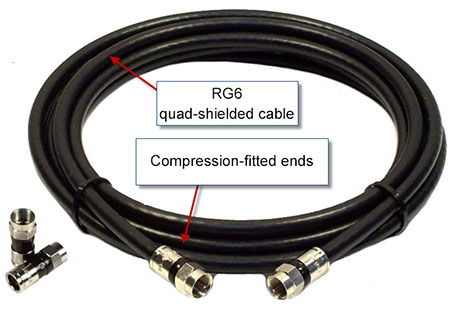
An example of a coax cable

Resources

  • A to Z Index
  • Find People
  • Maps
  • Email
  • Student Information System (SIS)
  • D2L
  • Libraries
  • Tech Support
  • MSU Misconduct Hotline
  • Social Media Directory
  • Events Calendar
  • For Media

Health and Safety

  • MSU Police and Public Safety
  • Olin Health Center
  • Counseling & Psychiatric Services (CAPS)
  • University Health and Wellbeing
  • MSU Health Care
  • Civil Rights and Title IX
  • Our Commitment
  • Center for Survivors
  • Security & Fire Safety Report
  • University Policy on Relationship Violence and Sexual Misconduct
  • Notice of Non-Discrimination, Anti-Harassment and Non-Retaliation
  • Health Care Non-Discrimination Notice

Support Services

  • Disability Resources
  • LiveOn Neighborhood Resources
  • Spartan One-Stop
  • University Health & Wellbeing

Working at MSU

  • Human Resources
  • EBS Login
  • Job Postings
  • Employee Assistance Program

Reports

  • CARES Act Funding
  • Student Achievement and Outcomes

Contact us

517-355-1855

Address

Michigan State University
426 Auditorium Road
East Lansing, MI 48824

Releases and Statements

Follow Us

  • Visit our Facebook page
  • Visit our page on X
  • Visit our LinkedIn page
  • Visit our YouTube page

If you're having accessibility issues, please let us know.

Know MoreTransparency
  • Contact Information|
  • Site Map|
  • Privacy Statement|
  • Site Accessibility|
  • Call MSU: (517) 355-1855|
  • Visit: msu.edu|
  • Notice of Nondiscrimination|

SPARTANS WILL|© Michigan State University|