• Jump to Header
  • Jump to Main Content
  • Jump to Footer
Michigan State University
Technology at MSU
  • Training
  • MSU Tech Store

Technology at MSU

  • About
    • About MSU IT
    • Mission, Vision, and Values
    • MSU IT Organization
    • MSU IT Leadership
    • Guidelines and Policies
    • Institutional Data Policy
    • Secure IT
    • Federated IT
    • MSU IT Projects
    • Office of the CIO
  • |
  • Services
    • Service Catalog
    • Request a Service
    • Business & Productivity Services
    • Consultation Services
    • Work & Workstation Services
    • Hardware & Software
    • Spartan 365
    • Zoom & Conferencing
    • Application Development
    • Network Services
    • Server, Data, and Storage Support
    • Cloud Services
    • Web Services
    • AI Services
    • Data & Analytics
    • Technology in Classrooms
    • Google Workspace
    • Teaching & Learning Services
    • High Performance Computing
    • Research Technology & Collaboration
  • |
  • Help and Support
    • Get Help / Contact IT
    • Report an Issue
    • Service Status
    • Getting Online
    • Classroom Support
    • Workstation / Desktop Support
    • Digital Accessibility Support
    • Visitor & Guest Support
    • IT Partners & Service Providers
    • Knowledge Base / Documentation
    • Training
    • Orientation
    • FAQs
  • |
  • Students
    • New Students
    • Getting Online
    • Email / Spartan Mail
    • D2L
    • Printing
    • Computer Labs
    • MSU Mobile App
    • Help & Support
    • Security Tips
    • Password Help
    • MSU Tech Store
  • |
  • Faculty and Staff
    • Faculty
    • Staff
    • Orientation
    • Workstation Support
    • IT Staff Resources
    • Training
    • Collaboration Tools
    • Remote Work Tools
    • Staff Technology Tools
    • Storage & File Sharing
    • Software & Licensing
    • Teaching Tools
    • Research Technology Support
    • Lab / Classroom Scheduling
    • Web Technology Tools
    • Security Resources
  • |
  • SecureIT
    • Multi-Factor Authentication
    • Research Security
    • Safeguard Your Devices
    • Phishing
    • Passwords
    • File Sharing & Copyright
    • Handling Data
    • Securing Data
    • Data & Hardware Disposal
    • Employee Guide
    • Admin & Supervisor Guide
    • IT Security Checklists
    • Security Incident
    • Website Security Standards
    • Cybersecurity Awareness Training
    • MSU Information Security Program Plan
    • Single Sign-On & Self-Service Password Reset
  • |
  • News
Get IT Help
Technology at MSU
  • About
  • Services
  • Help and Support
  • Students
  • Faculty and Staff
  • SecureIT
  • News

< About

  • About MSU IT
  • Mission, Vision, and Values
  • MSU IT Organization
  • MSU IT Leadership
  • Guidelines and Policies
  • Institutional Data Policy
  • Secure IT
  • Federated IT
  • MSU IT Projects
  • Office of the CIO

< Services

  • Service Catalog
  • Request a Service
  • Business & Productivity Services
  • Consultation Services
  • Work & Workstation Services
  • Hardware & Software
  • Spartan 365
  • Zoom & Conferencing
  • Application Development
  • Network Services
  • Server, Data, and Storage Support
  • Cloud Services
  • Web Services
  • AI Services
  • Data & Analytics
  • Technology in Classrooms
  • Google Workspace
  • Teaching & Learning Services
  • High Performance Computing
  • Research Technology & Collaboration

< Help and Support

  • Get Help / Contact IT
  • Report an Issue
  • Service Status
  • Getting Online
  • Classroom Support
  • Workstation / Desktop Support
  • Digital Accessibility Support
  • Visitor & Guest Support
  • IT Partners & Service Providers
  • Knowledge Base / Documentation
  • Training
  • Orientation
  • FAQs

< Students

  • New Students
  • Getting Online
  • Email / Spartan Mail
  • D2L
  • Printing
  • Computer Labs
  • MSU Mobile App
  • Help & Support
  • Security Tips
  • Password Help
  • MSU Tech Store

< Faculty and Staff

  • Faculty
  • Staff
  • Orientation
  • Workstation Support
  • IT Staff Resources
  • Training
  • Collaboration Tools
  • Remote Work Tools
  • Staff Technology Tools
  • Storage & File Sharing
  • Software & Licensing
  • Teaching Tools
  • Research Technology Support
  • Lab / Classroom Scheduling
  • Web Technology Tools
  • Security Resources

< SecureIT

  • Multi-Factor Authentication
  • Research Security
  • Safeguard Your Devices
  • Phishing
  • Passwords
  • File Sharing & Copyright
  • Handling Data
  • Securing Data
  • Data & Hardware Disposal
  • Employee Guide
  • Admin & Supervisor Guide
  • IT Security Checklists
  • Security Incident
  • Website Security Standards
  • Cybersecurity Awareness Training
  • MSU Information Security Program Plan
  • Single Sign-On & Self-Service Password Reset

< News

  • Training
  • MSU Tech Store
Get IT Help

Sept. 27, 2023 | Read time 4 min

Volunteers, new software help ID Office provide better Move-in Week student experience

By: Travis Silvas

The line at the ID Office during Fall Move-in resembled a scene you’d find at a popular theme park. Almost 12,000 students, faculty, and staff received a new MSU ID during two weeks in mid-August. Nearly 8,000 passed through the ID Office doors to receive their ID card or to purchase a student bus pass.
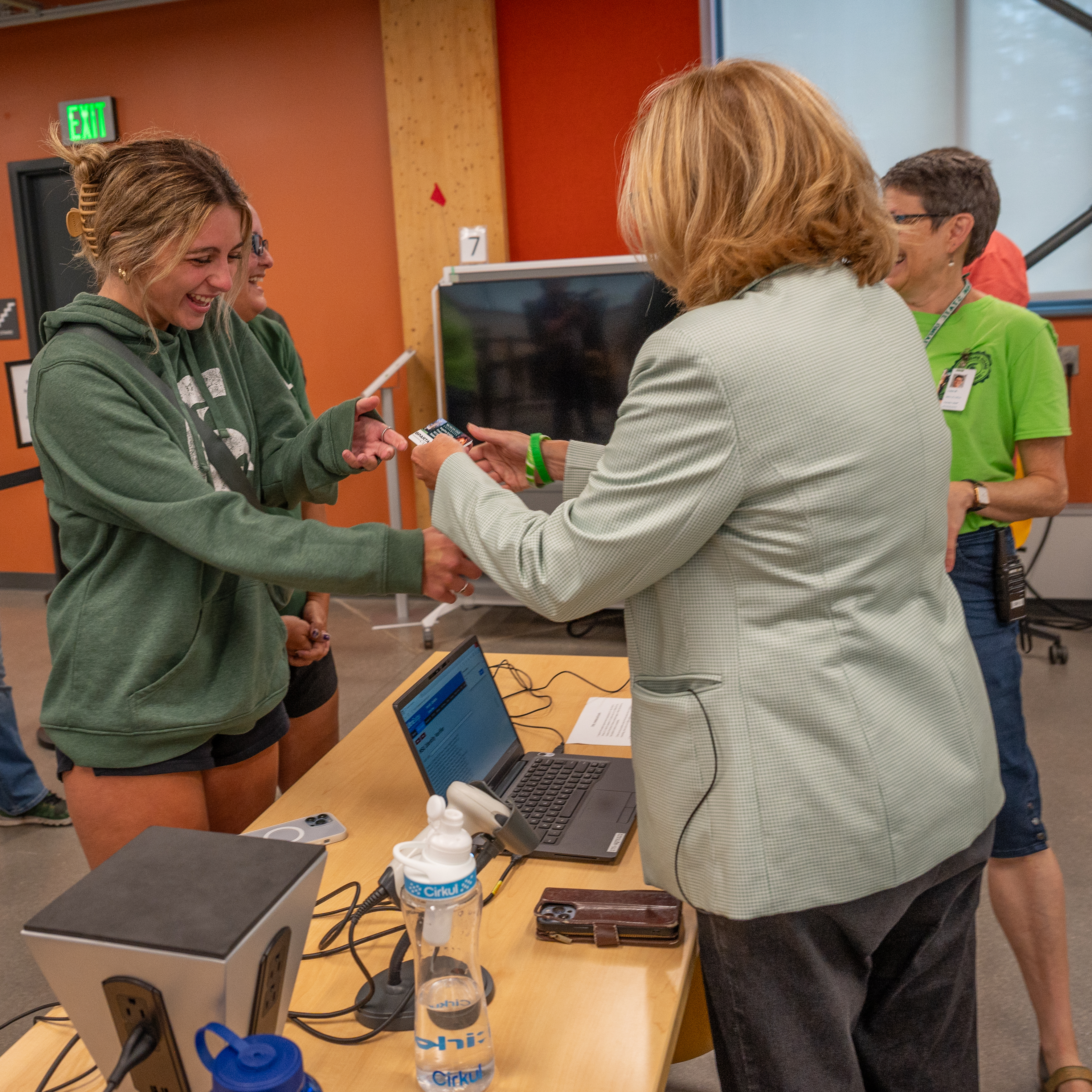
MSU Interim President Teresa Woodruff hands an incoming student her MSU ID card

MSU Interim President Teresa K. Woodruff hands an incoming student her MSU ID card during Fall 2023 Move-In Week.

As daunting as it sounds, the process went relatively smoothly this year, largely thanks to a small army of volunteers and the introduction of a new photo system the ID Office launched in time for the start of the new academic year.

The enhanced feature improves the experience for students who upload photos to have their ID pre-printed. Thanks to successful testing during the spring, the campus-wide rollout of the new system this fall saw more than 6,700 incoming students take advantage of the opportunity, significantly reducing their wait in line and the workload on staff and volunteers.

“In previous years, we were using a homegrown solution where students had to actively log in and upload a photo,” said Lisa Berg, ID Office Manager. “The solution reached a point where it could no longer handle the file size being generated by pictures taken by a student’s phone. The rate of failure was pretty high.”

The new solution addressed two issues. First, every new student receives an email inviting them to upload a photo for their MSU ID card, simplifying the process.

“We now have the ability to customize the communication with each student so there is an understanding of the process and any issues related to photos being rejected,” Berg said.

Second, the new software improves upon the accepted file size, significantly decreasing student uploads’ failure rate.

“I had a great experience with getting my ID. It was fast, easy, and had great instructions,” stated MSU first-year student Leland Huber. “Once I got the email for ID photo submission, it was as easy as looking through my camera roll and finding a photo that followed the rules. Within a day or two, I had a confirmation email that my picture was approved.”

With the new system’s success, volunteers and staff distributed 4,320 of the pre-printed ID cards at the STEM Building over four days. The ID Office extended hours and utilized two pick-up locations this year to help reduce wait times.

“The extended hours and two operations required staffing way more than we can handle,” Berg said. “Fortunately, many Student Life and Engagement (SLE) and MSU IT volunteers stepped forward to help. Because of the level of volunteers that stepped forward, we could provide a much more efficient and quicker service to the students at both locations, which meant they had to spend less time in line.”

Berg said one of the volunteers’ most significant roles was interacting with everyone in line to ensure they were in the right place and had the proper items to get their ID.

“Everything was more efficient and much better for the student experience because of that,” Berg said.

Huber said he picked up his ID from the STEM building and did not have to wait in line. His roommate, however, was not as lucky.

“I have a roommate who did not submit a picture online and had to go to the International Center and wait for an hour and 40 minutes to get his ID,” Huber stated. “Submitting the photo early saved me lots of time during move-in, and I felt like it was set up in a way to lessen the stress of move-in week.”

Berg sincerely thanked MSU IT and Student Life and Engagement volunteers and her ID Office staff.

“They stepped up in a big way to work expediently and efficiently to provide excellent customer service under the pressure of long lines of 1000s of customers,” Berg said. “You all worked with exceptional professionalism, and we never lost our sense of humor.”

Resources

  • A to Z Index
  • Find People
  • Maps
  • Email
  • Student Information System (SIS)
  • D2L
  • Libraries
  • Tech Support
  • MSU Misconduct Hotline
  • Social Media Directory
  • Events Calendar
  • For Media

Health and Safety

  • MSU Police and Public Safety
  • Olin Health Center
  • Counseling & Psychiatric Services (CAPS)
  • University Health and Wellbeing
  • MSU Health Care
  • Civil Rights and Title IX
  • Our Commitment
  • Center for Survivors
  • Security & Fire Safety Report
  • University Policy on Relationship Violence and Sexual Misconduct
  • Notice of Non-Discrimination, Anti-Harassment and Non-Retaliation
  • Health Care Non-Discrimination Notice

Support Services

  • Disability Resources
  • LiveOn Neighborhood Resources
  • Spartan One-Stop
  • University Health & Wellbeing

Working at MSU

  • Human Resources
  • EBS Login
  • Job Postings
  • Employee Assistance Program

Reports

  • CARES Act Funding
  • Student Achievement and Outcomes

Contact us

517-355-1855

Address

Michigan State University
426 Auditorium Road
East Lansing, MI 48824

Releases and Statements

Follow Us

  • Visit our Facebook page
  • Visit our page on X
  • Visit our LinkedIn page
  • Visit our YouTube page

If you're having accessibility issues, please let us know.

Know MoreTransparency
  • Contact Information|
  • Site Map|
  • Privacy Statement|
  • Site Accessibility|
  • Call MSU: (517) 355-1855|
  • Visit: msu.edu|
  • Notice of Nondiscrimination|

SPARTANS WILL|© Michigan State University|