



New and existing AI assistants to support teaching, learning, and work can be found on tech.msu.edu/ai. You’ll also find important guidance on the appropriate use of these tools below.
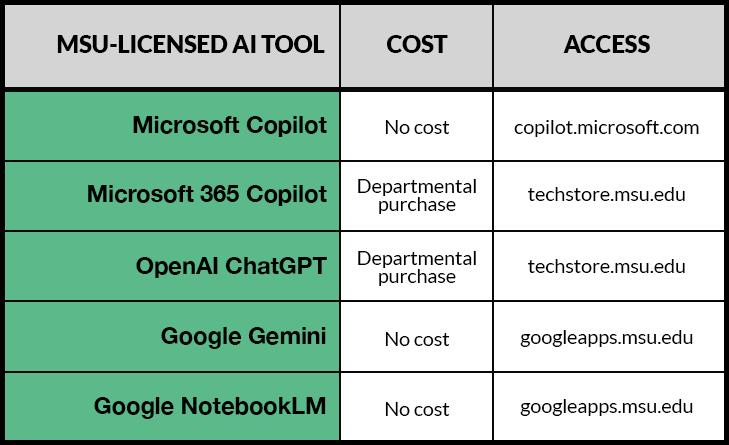
Google Gemini & NotebookLM
- Google Gemini and NotebookLM are now available at no cost to all students, faculty, and staff with an MSU Google account. These AI tools support tasks such as writing assistance, summarization, and organization.
- NotebookLM helps structure and explore notes using AI-powered insights. MSU IT is exploring the ability for users to purchase upgraded (Pro) versions of these tools.
- Access them with your MSU credentials at googleapps.msu.edu.
Microsoft Copilot
- Microsoft Copilot Chat is available at no cost to students, faculty, and staff with an MSU Spartan 365 account.
- It supports tasks such as coding, writing, image generation, and general Q&A. Copilot uses a combination of AI models and ensures enterprise-level data protection. When accessed with MSU credentials, data entered remains secure and is not used to train the AI model.
- Access Copilot using your MSU credentials at copilot.microsoft.com.
Microsoft 365 Copilot
- Microsoft 365 Copilot integrates AI directly into Outlook email and core Microsoft apps including Word, Excel, Teams, PowerPoint, and content stored in SharePoint.
- It securely connects your information across Microsoft apps and connected systems to help you analyze, write, summarize, and present more efficiently.
- M365 Copilot has recently dropped in price and is available only to faculty, staff, and students whose departments purchase licenses through techstore.msu.edu.
OpenAI ChatGPT
- Available as an enterprise application for faculty and staff. This version offers enhanced data protection and improved privacy terms. It requires departmental purchase and is currently classified as a Tier 3 application, which includes an annual IT Readiness form.
- Learn more about ChatGPT and purchase ChatGPT Edu at the MSU Tech Store.
AI data guidance
Personal free or personal paid versions of AI tools do not offer the same level of data protection as those provided under MSU’s enterprise agreements. Personal or free versions often use your data to train AI models. As a security reminder, users should never share MSU credentials, especially to access enterprise tools.
While some vendors may offer promotional access, or you may already have personal accounts, it is essential to use the enterprise versions (with your @msu.edu email) to ensure compliance with MSU’s AI Data Standards and institutional data policies and to keep your data secure.
Learn more about MSU AI resources at ai.msu.edu and more about AI tools and institutional data policies at tech.msu.edu/ai.

